
Platform
Teaching with UAVProg
What the product does for a teacher, the three screens you will actually use, and the shape of a term.
You do not need to know how to program. You do not need to have flown a drone. Your students will write short programs, a drone will fly them on screen, and your job is the one you already do: notice who is stuck, and go and help them.
This page is the map. Every page after it is one part of the map in detail.
What a lesson actually looks like
A student opens a lesson. The instructions are on the left. On the right they drag coloured blocks together — “take off”, “fly forward 2 metres”, “land” — and press a button. A drone takes off in a 3D view and flies what they built. If it lands where the lesson asked, they pass. If it does not, they can see why and try again.
Nothing is typed. Nothing is installed. It all happens in the web browser you are reading this in.
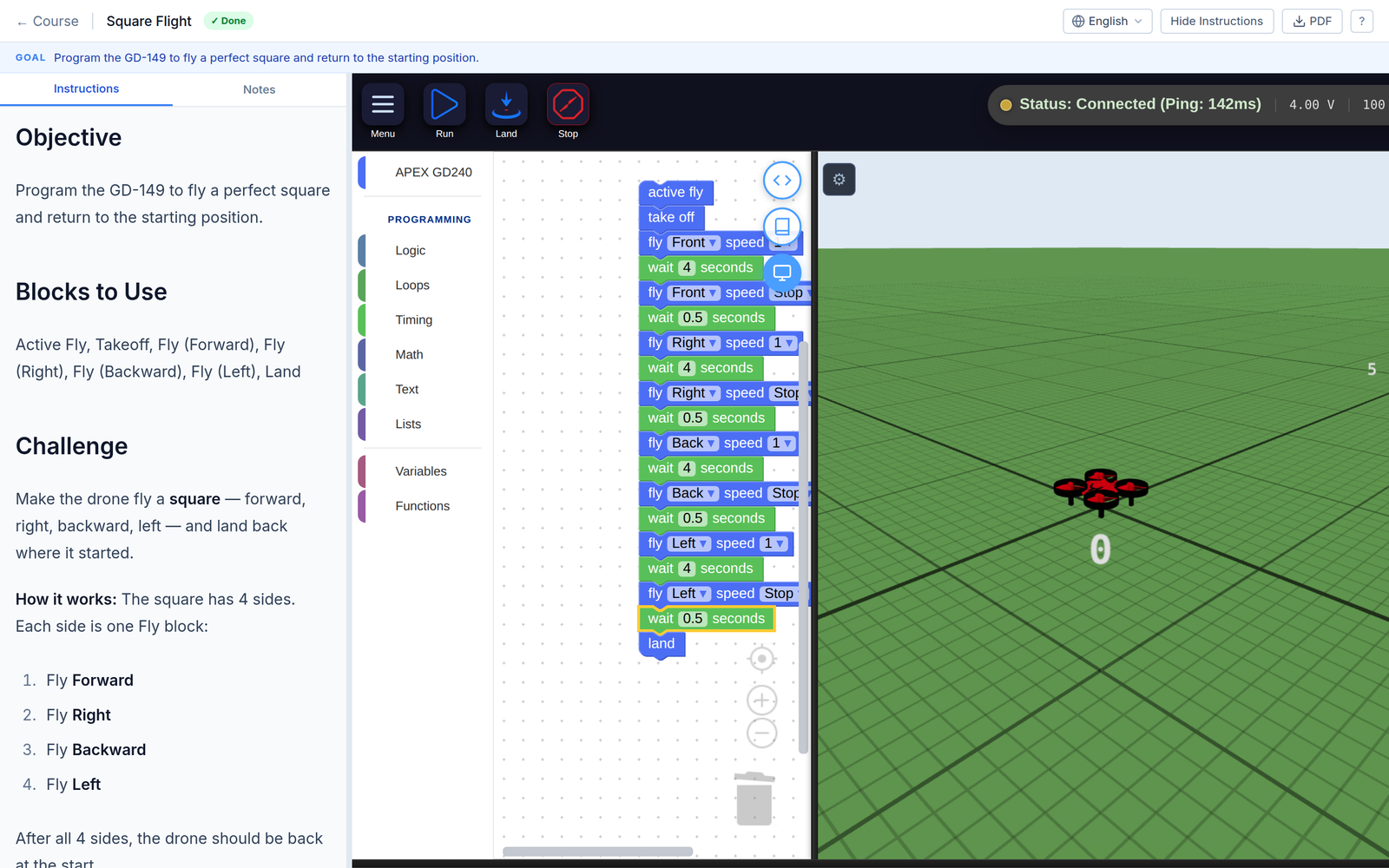
One lesson, as a student sees it. The brief on the left, the blocks they build in the middle, the drone flying what they built on the right.
The shape of a term
Six things happen, roughly in this order, and only the first two are one-offs.
The three screens you will use
Almost everything a teacher does happens on three pages. They nest: the board sends you to a class, the class sends you to a student.
My Classes is the front page of your teaching, at /teacher. It is a wall
of small panels — how the class scored, who has not started, who has gone
quiet, which mission everyone is failing. It answers who needs me today.
Reading your dashboard takes every
panel in turn.
Manage class is one class in detail. Five tabs: Progress, Assignments, Students, Quiz Analytics, Settings. This is where you set the work and where you see the full grid of every student against every mission.
A student’s page is one child. Every attempt they made, the code they wrote, and a box where you can write them feedback they will read.
Words this product uses
Four words are used in a specific way. Everything else means what you expect.
| Word | What it means here |
|---|---|
| Course | A subject, like “Flight Basics”. Made of lessons. |
| Lesson | One sitting. Instructions, sometimes a short quiz, usually one or more missions. |
| Mission | One thing to fly and get right. This is the unit that gets a score. |
| Assignment | You saying “this class does this course, by this date”. A course exists whether or not you assign it; an assignment is the bit with your class’s name and a deadline on it. |
What to read next
- Do not have an account yet, or waiting for approval → Getting a teacher account
- About to add students → The three kinds of student account first, then Your class and its code. Read them in that order; the account type decides what you can do for a child later.
- Account and class ready → Assigning work
- Students already working → Reading your dashboard
- Wondering what the platform tells you about a child, and what it deliberately does not → What you cannot see, and why