Platform
The three kinds of student account
Whether a child has an email address decides how they sign in, who can help them when they forget, and what you are allowed to do. Decide this before you invite anybody.
This is the most misunderstood thing in the product, and the one that is hardest to undo later. Read it before you invite anyone.
There are three ways somebody gets a UAVProg account. The difference that matters is not “student or teacher”. It is whether the account has an email address at all — because that one fact decides how they sign in, who can rescue them when they forget their password, and what you are permitted to do on their behalf.
The three kinds, side by side
| Student, own account | Student with a class code | Teacher | |
|---|---|---|---|
| Email address | Required | None at all | Required |
| Signs in with | Email or callsign | Callsign only | Email or callsign |
| Who resets a forgotten password | They do, by email | Only their teacher | They do, by email |
| Can you remove them from your class | Yes | Yes | — |
| Do they keep working if they leave your class | Yes | Yes — but nobody can rescue the password | — |
| Free trial | 14 days, full features | None of their own — rides the school | Same as a student |
| Suits | Older students, homework, sixth form | Under-13s, whole classes, school devices | You |
Which one do you want?
What a class-code signup actually looks like
Your student goes to the sign-up page and picks the middle option: “My teacher gave me a code.”
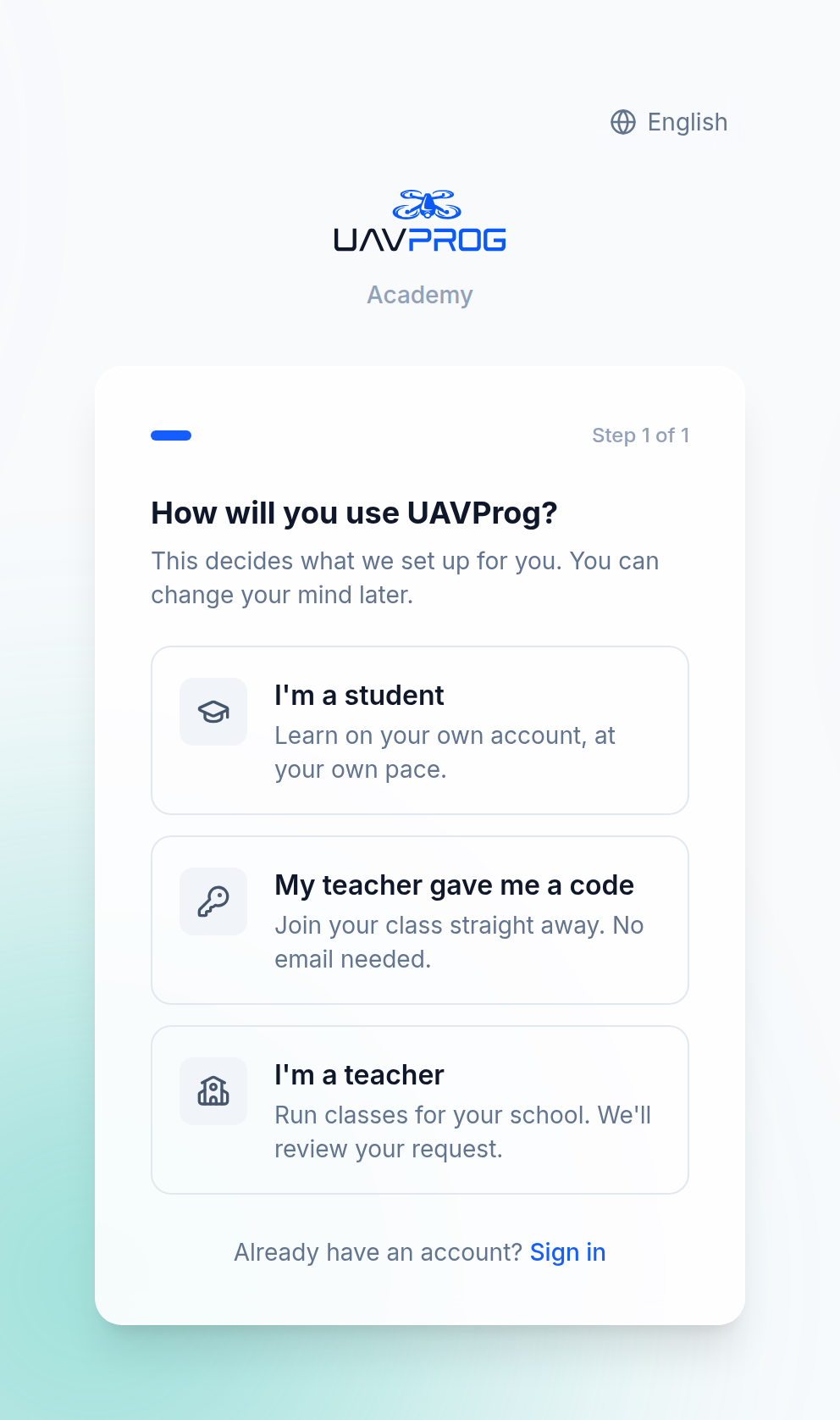
The first screen. Tell your class to press the middle one. It is the only path that never asks for an email.
They type your class code. Before they go any further, the screen shows them which class they are about to join, at which school, with which teacher —
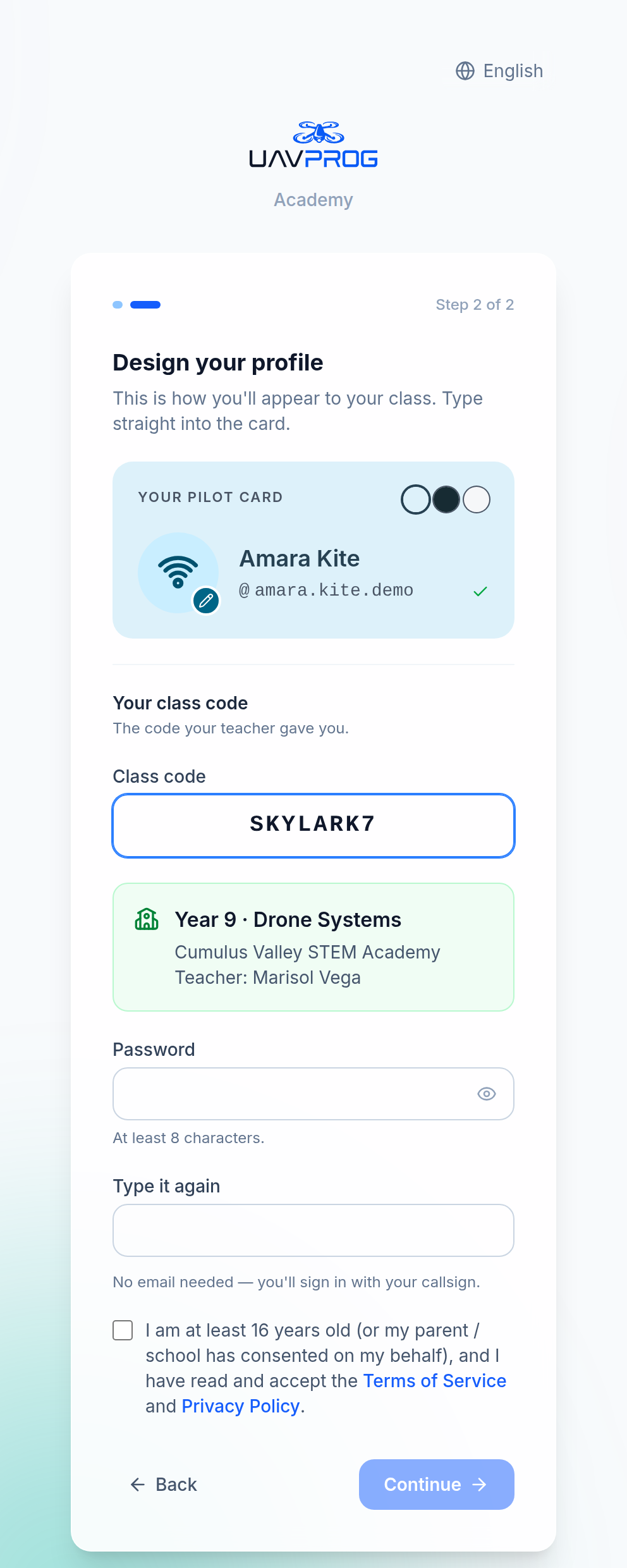
A code typed correctly resolves to a real class before anything is created. If a child mistypes, they find out here, not after they have made an account in the wrong place.
— then they pick a name, a callsign and a badge, choose a password, and they are in. Three screens. No email, no confirmation code, nothing to wait for.
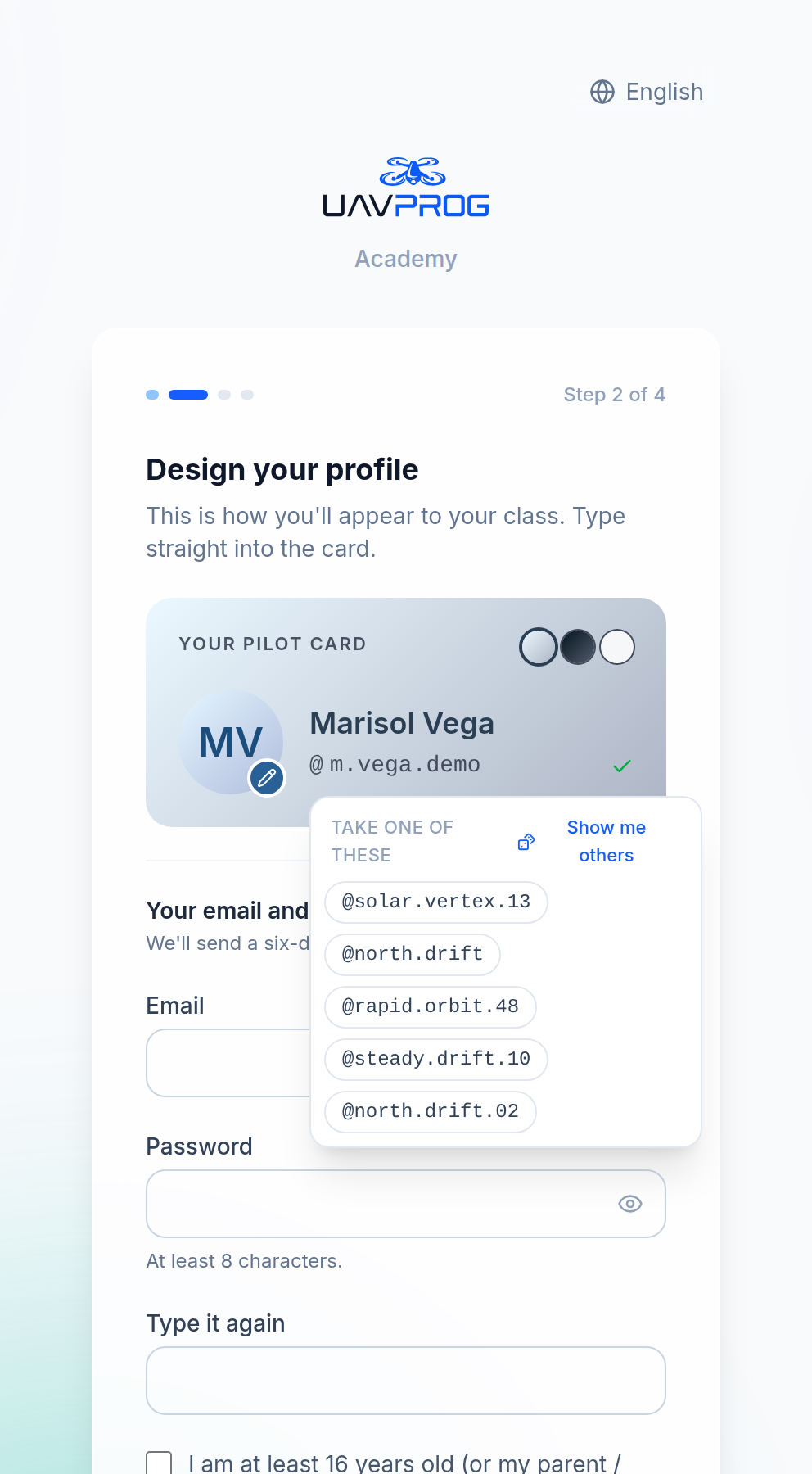
If a child cannot think of a callsign, the field offers some. Every one it offers is genuinely free — it will never suggest a name and then refuse it at the end.
The callsign is the credential
For a class-code student, the callsign is not decoration. It is their username. There is no email to fall back on. Say this out loud when you hand out the codes, and have them write it down.
A callsign is 3 to 24 characters, lower-case letters and numbers, and may
contain . _ - in the middle but not at either end and never doubled.
What you can and cannot do for each kind
This is the part people get wrong.
| What you may do | Class-code student no email address | Student with their own account has an email address |
|---|---|---|
| Reset their password | ✓ | ✗ — the platform refuses |
| See their name, scores and work | ✓ | ✓ |
| Write them feedback | ✓ | ✓ |
| Give them more attempts | ✓ | ✓ |
| Remove them from the class | ✓ | ✓ |
| Read their private notes | ✗ | ✗ |
One row differs. Everything a teacher does to help — feedback, more attempts, seeing the work — is identical for both. And nobody’s private notes are readable by a teacher, whichever kind of account it is; see What you cannot see, and why.
The Students tab of your class shows this directly. Look at the Email column: an address, or a dash. The Reset password button appears next to the dashes and nowhere else.
That is not a bug, and it is not the platform being unhelpful. A student with their own email owns that account — it is theirs, it carries their address, and they can reset it themselves in thirty seconds. If a teacher could take it over, then a teacher could take over any account that ever passed through their class. So the platform refuses, and says why:
this student has their own email address — they can reset their password themselves
When a child forgets their password
This will happen in week three. Here is the whole procedure.
Check which kind of account it is
Open your class → Students. Find their row and look at the Email column.
A dash? Carry on to the next step.
An address? You cannot help, and you should not try. Send them to the sign-in page and have them press Forgot password? A reset link goes to that address. If they cannot get into that mailbox either, that is a problem for whoever runs the mailbox, not for UAVProg.
Press Reset password on their row
The button only exists on rows with no email address.
Read out the password on the screen
A twelve-character password appears. It is all lower-case letters and digits, and the ones that get misheard or miscopied across a classroom have been left out on purpose: no
o, nol, noi, no0and no1. You can read it aloud without spelling anything twice.It is shown once and never again. There is nowhere to email it and nothing to look it up from later. Read it out, or write it on a slip of paper, before you close the box.
They sign in and change it
They sign in with their callsign and the temporary password, then change it to something they will remember.
Things that stop the reset working
- They are not in this class. You can only reset for students in a class you teach. If you removed them from the class first, put them back.
- They added an email address themselves. Any student with no email sees a small banner offering “Add an email” — and, if your school has Google sign-in switched on, “Connect Google instead”. If they took it, they now own the recovery route, and the reset button disappears from your view of their row. This is a good thing, and it is the intended way for a student to take their account with them when they leave your school.
- They are not actually a student. The reset works on student accounts only. A colleague sitting in your class as a member cannot have their password reset by you, even if their account happens to have no email.
Two things that surprise people
Joining a class does not change what kind of account someone has. A student who made their own account with an email, and then typed your class code, is still an own-account student. They keep their email, they keep their own password recovery, and you still cannot reset it. The class code is a door, not a conversion.
A class-code student’s access comes from the school, not from a trial. An own-account student gets a 14-day full-featured trial when they sign up. A class-code student gets no trial of their own, because they do not need one — their access rides on the school’s arrangement for as long as they are in it.
Next
→ Your class and its code — making the class, handing out the code, and the two limits that decide how many students you may have.