Platform
What UAVProg is
What the product does, what you need to try it, what it costs, and what it is not.
UAVProg teaches programming by flying drones. Students drag coloured blocks together to build a program, and a simulated drone flies it on screen. It runs entirely in a web browser.
If you are deciding whether to use this with a class, this page is the honest version: what it does, what you need, what it costs, and what it is not.
What a student actually does
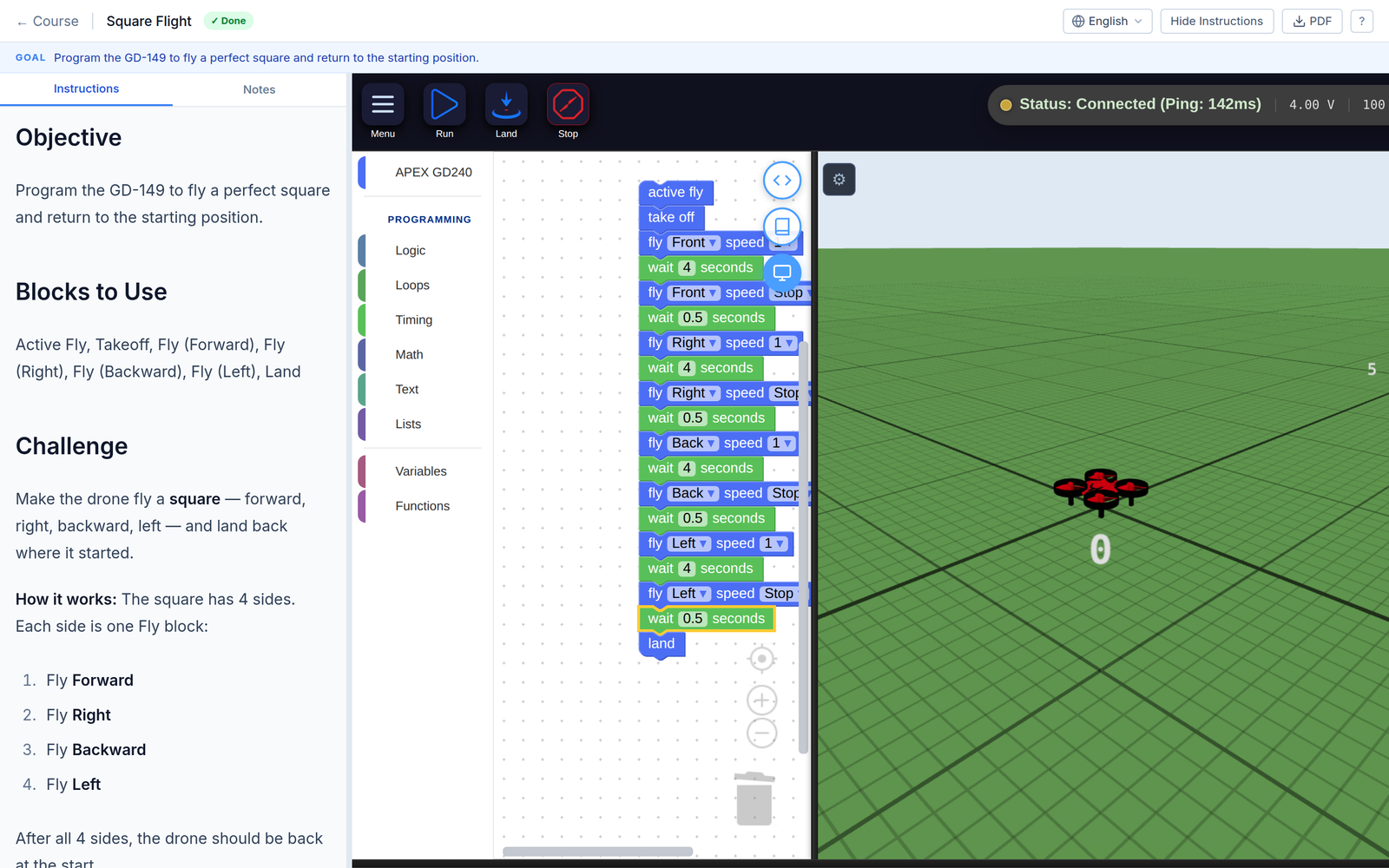
One lesson. The brief on the left, the program in the middle, the drone flying it on the right — all in one browser tab.
They read a short brief, assemble a program out of labelled blocks — take off, fly forward, land — and press run. A drone takes off in a 3D view and flies what they built. If it does what the mission asked, they pass; if not, they can see why and try again.
Nothing is typed. There is no syntax to get wrong, so the failures are about thinking, which is the part worth teaching. Students who want the text version can see the Python their blocks produced, but they never have to write it.
What you need
A browser. That is the whole list.
- No installation, on any machine.
- No drone. The drone is simulated. Hardware is optional and comes later.
- No per-machine setup, no lab image, no admin rights.
- Works on the school laptops you already have. The 3D view needs a reasonably current browser — Chrome, Edge, Firefox or Safari.
One thing to check with your IT department before a whole class tries it: the simulator holds a live connection open to keep the 3D view moving. Some school filters close connections like that. The symptom is distinctive — everything loads, the drone appears, and then it never moves. The words IT will need are “WebSocket connections are being closed”.
What it costs to try
Nothing, and there is no card.
- Free forever — the core catalogue, block coding, the 3D simulator, the circuits, embedded and robotics labs, progress tracking, notes and achievements.
- Pro — the full catalogue including advanced tracks, flying a real drone through UAVProg Link, PDF export. New personal accounts start on a 14-day Pro trial with no card, and when it ends you drop to Free and keep everything you made.
- Schools — per-seat, billed annually. Adds the classroom layer: classes, rosters, assignments, gradebook export and the teacher analytics dashboard.
What a teacher gets
The classroom layer is the part that separates this from a free coding site.
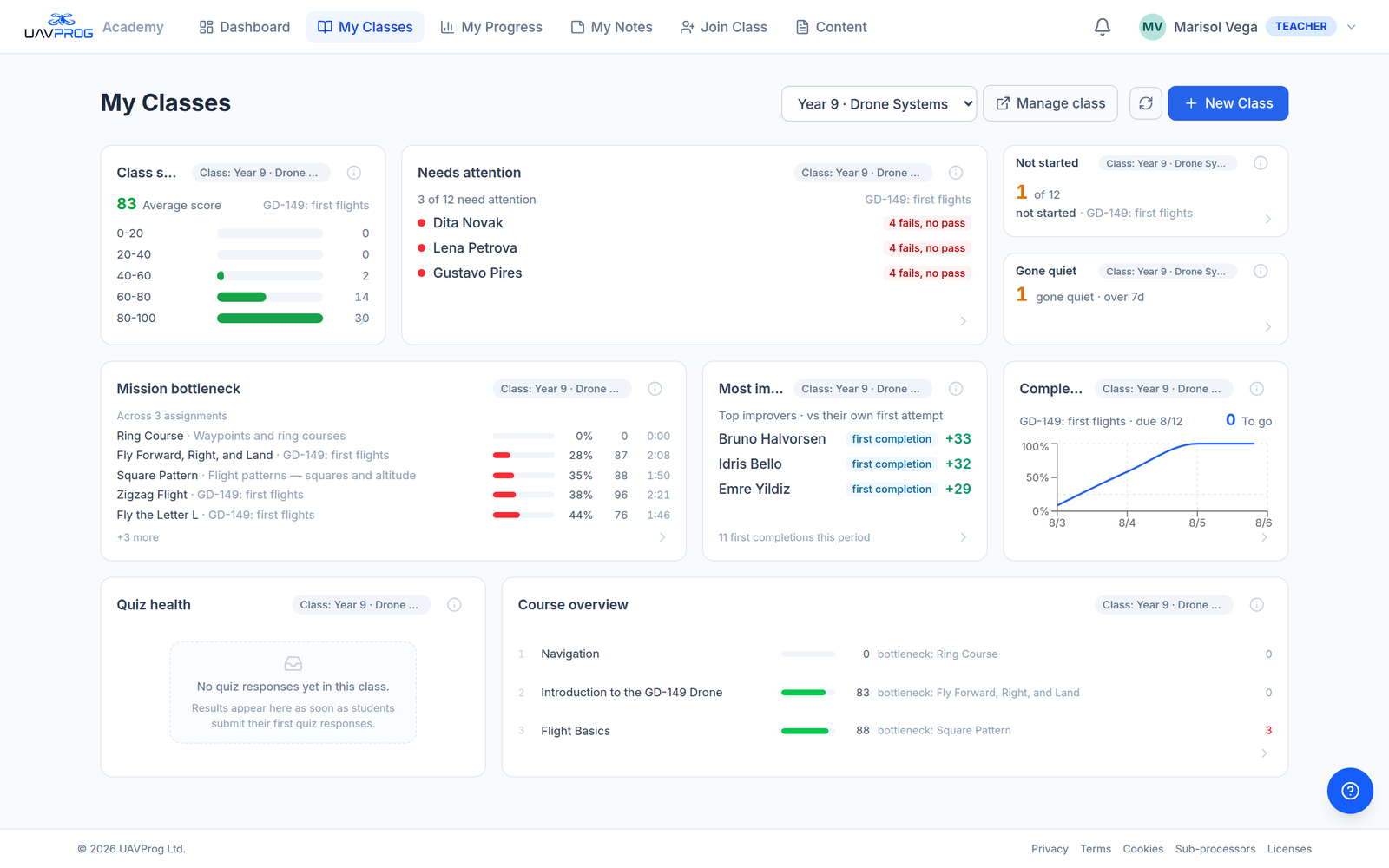
The teacher home. Every panel answers a question you would otherwise ask thirty students one at a time.
- Classes with an invite code. You do not create student accounts. You hand out an eight-character code and the class joins itself.
- Students without email addresses. A student who joins with a class code never gives an address — which removes a real obstacle for under-13s. Their teacher can reset their password; that is the trade.
- Assignments with deadlines and attempt limits, per class.
- A dashboard that names people, not just averages — who is stuck at the attempt cap, who has not started with the deadline coming, who has gone quiet for a week, which mission the class cannot pass.
- Gradebook export as CSV.
- Your own courses. Teachers can write lessons and set them class-only, which skips the public catalogue and any review.
Teaching with UAVProg is the full treatment.
What it is not
Worth being straight about, because finding out in week three is worse.
- It is not a flight-training product. It teaches programming, using a drone as the thing being programmed. A student who finishes the catalogue can write a program that flies a route; they are not a trained pilot.
- The simulator is a teaching model, not an engineering one. The physics is real — mass, motor lag, drag, wind, thinning air, a draining battery — so bad flying fails for real reasons. But there is no satellite positioning, no radio link and no weather beyond wind, and nothing is calibrated to a specific aircraft. A clean simulated flight says the program is right; it does not predict how a real airframe behaves. What the simulator models is the full list.
- Some analytics are still previews. Several dashboard panels are labelled MOCK in the product itself, and the per-student insight strip is sample data on every student’s page. The nine panels on the teacher home are live; the rest announce themselves. This documentation says which is which rather than glossing over it.
- There is no organisation admin yet. One UAVProg administrator approves teacher accounts; a head of department cannot yet approve their own staff.
- Billing is not self-service yet, as above.
How a school starts
The one step that is not instant is the second. A teacher account is granted by hand, not by ticking a box, because a teacher account can see other people’s children. Writing from your school email address is what makes it quick — see Getting a teacher account.
Where to go next
- Running a class → Teaching with UAVProg
- The ten-minute version → Quick start
- What the coding actually looks like → Blocks
- What the simulator does → Simulator