
Blocks
Your first program
Three blocks that fly a drone — and the Python they wrote for you.
You build a program by dragging blocks and snapping them together. There is nothing to type and nothing to spell correctly. Three blocks are enough for a real flight.
Build it
Open the drone's category
The strip down the left side is the toolbox. The top entry, APEX GD240, is the drone’s own category — every block that makes the aircraft move lives in there. The categories underneath, under PROGRAMMING, are the ones every program uses: Logic, Loops, Timing, Math, Text, Lists, Variables and Functions.
Click APEX GD240. The blocks slide out beside it.
Drag out active fly
Drag the active fly block onto the empty canvas.
Nothing happens yet, and that is correct.
active flywakes the motors up. A drone that has not been woken will ignore everything else you ask it.Snap take off underneath
Drag take off and let go just below the first block. It clicks into place by itself — the bump on the bottom of one block drops into the notch on the top of the next.
Blocks that are not snapped to the ones above them still run, but they run as a separate program. If a block is sitting on its own in a corner of the canvas, that is almost always the problem.
Snap land underneath
land goes last. End every program with it. A program that just stops leaves the drone hovering where it was until the session gives up on it.
Press Run
Run is the blue arrow at the top of the screen, next to the menu. The aircraft lifts, holds, and comes back down.
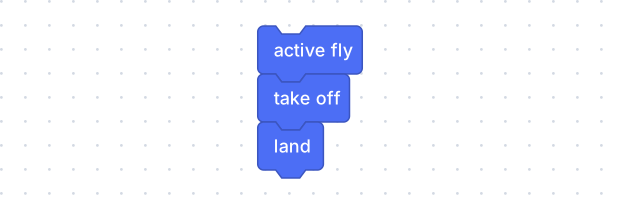
The whole program. Three blocks, in this order.
What the blocks wrote
On the right edge of the screen there is a <> button. Press it and this
appears:
import time
import os
from apex_sim import ApexSimDrone

drone = ApexSimDrone(
    zenoh_endpoint=os.environ.get("ZENOH_CONNECT_ENDPOINT", "tcp/127.0.0.1:7447"),
    wait_seconds=float(os.environ.get("ZENOH_WAIT_SECONDS", "1.0")),
)
drone.connect()

drone.active_fly()
drone.takeoff()
drone.land()

drone.disconnect()
You did not write that and you never have to. It is worth a look anyway, because three of those lines are yours:
| Your block | Its line |
|---|---|
| active fly | drone.active_fly() |
| take off | drone.takeoff() |
| land | drone.land() |
One block, one line, in the same order top to bottom. That is the whole trick, and it does not stop being true when the programs get bigger.
Change one thing
Now go back to the blocks and change something small.
- Put a second take off in. What does the drone do?
- Take active fly out and press Run. Nothing flies — that is the block doing its job.
- Drag land to the top of the stack. It will land before it has taken off.
Watching a program go wrong on purpose is the fastest way to learn what each block is really for. In the simulator it costs nothing.