
Blocks
Variables and Functions
A name for a number, and a name for a group of blocks — the two ways a program stops repeating itself.
These two categories start empty, and that is not a mistake. Everything in them is something you make, so until you have made something there is nothing to show. Each has a button at the top of its flyout instead: Create variable… and Create function….
Variables
A variable is a box with a name written on it. You put a number in, and after that you can say the name instead of the number.
Press Create variable…, type a name, and three blocks appear in the category:
| Block | What it does | What it writes |
|---|---|---|
| set hop time to ⟨value⟩ | Puts a value in the box. A stacking block. | hop_time = 2 |
| hop time | Hands over what is in the box. A value block. | hop_time |
| change hop time by ⟨value⟩ | Adds to what is already in there. | hop_time = (hop_time if isinstance(hop_time, Number) else 0) + 1 |
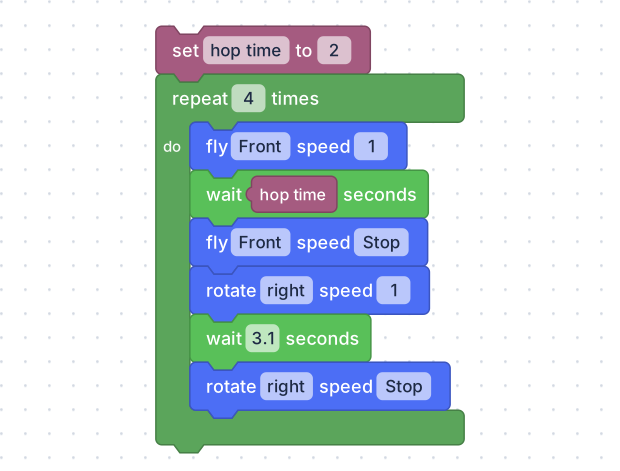
One number, named once at the top, used inside the loop.
hop_time = None


hop_time = 2
for count in range(4):
  drone.fly('forward', 1)
  time.sleep(hop_time)
  drone.fly_stop()
  drone.rotate('right', 1)
  time.sleep(1)
  drone.rotate_stop()
The point is not that it saves typing — there is no typing. It is that the
shape now has one number controlling its size. Change the 2 at the top
and every side changes together; without the variable you would be hunting
through the stack changing each wait and hoping you found them all.
Functions
A function is a name for a group of blocks. Make one, and it appears in the category as a single block you can use as many times as you like.
Press Create function…, and a definition block appears on the canvas:
| Block | What it does | What it writes |
|---|---|---|
| to fly one side do | The definition. It stands on its own — it has no notch and no bump, because it is not part of the flight. | def fly_one_side(): |
| fly one side | Uses it. This one goes in the stack. | fly_one_side() |
Here is the loop from Loops and Timing, written properly — a side is fly, wait, stop, turn, wait, stop, and the flight is that side, four times:
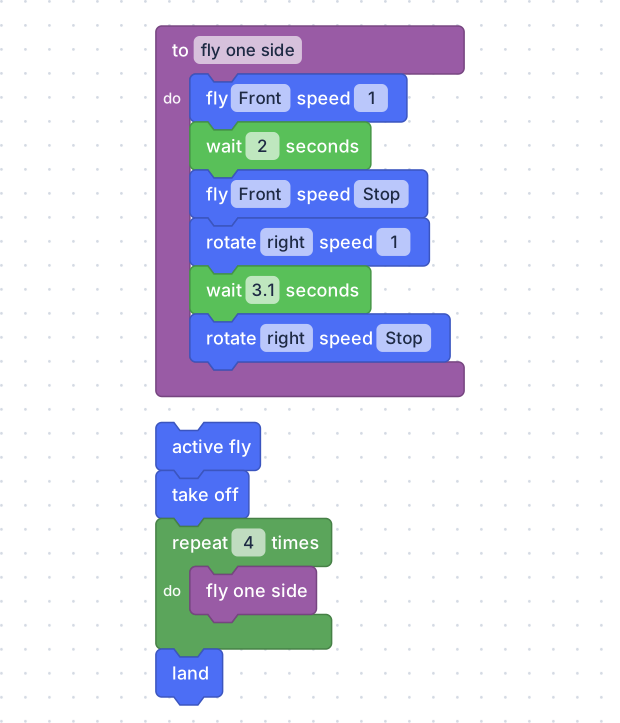
The definition sits on its own on the canvas. The program below it is four blocks long, and one of them is the whole side.
def fly_one_side():
  drone.fly('forward', 1)
  time.sleep(2)
  drone.fly_stop()
  drone.rotate('right', 1)
  time.sleep(1)
  drone.rotate_stop()


drone.active_fly()
drone.takeoff()
for count in range(4):
  fly_one_side()
drone.land()
Whatever shape it draws, it draws the same corner four times — which is the
property that makes it worth having. The wait after the turn is what decides
the angle, and at one second it is a shallow one, well short of a right angle
(see a corner takes longer than a second).
Raise that one number and every corner changes with it; that is the difference
between a square and a rounded blob, and there is only one place to make it.
The same program is a hexagon the day you change your mind: repeat 6 instead
of repeat 4, and the same one number in the turn. Nothing inside the side has
to change, and nothing can go half-changed.
Giving a function something to work with
Click the gear on the definition block and a panel opens where you can add
inputs — values the function is handed each time it is used. Add one called
seconds, drop it into the wait inside, and fly one side becomes a block
with a hole in it: fly one side for ⟨3⟩ seconds.
That is how a spiral is written without a count with loop at all: call the
function four times with 1, 2, 3 and 4.
Functions that answer a question
The gear panel also offers a definition with a return — a function that hands a value back instead of doing something. Those appear in the category as value blocks, rounded, to be dropped into holes rather than stacked.
A function called safe speed that constrains a number to 1 or 2 is a value
block you can use anywhere a speed is needed.