
Blocks
Lists and Text
Writing to the terminal, and keeping several values under one name.
The last two standard categories. Text is mostly one block you will use constantly and a dozen you probably never will; Lists is how a program holds more than one number under a single name.
Text
print ⟨value⟩ writes a line into the black terminal along the bottom of the screen. It is the most useful block in the category by a wide margin, because it is how you find out what a program is actually doing.
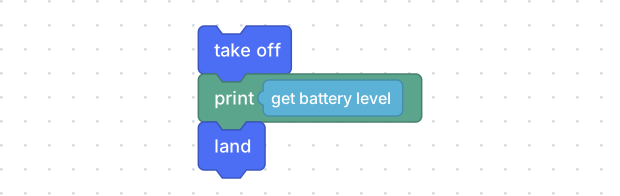
Anything that produces a value can go in the hole — here, the battery reading.
drone.takeoff()
print(drone.get_battery())
drone.land()
Put a print between two flight blocks and the terminal tells you the program
got that far. Put one inside a loop and it tells you how many passes happened.
Nothing in the editor debugs a program faster.
The rest of the category
| Block | What it does | What it writes |
|---|---|---|
| ” ” | A piece of text. Click it and type. | 'hello' |
| create text with | Joins pieces together. | ''.join([a, b]) |
| to x append text ⟨a⟩ | Adds to the end of a text variable. | x = str(x) + str(a) |
| length of ⟨a⟩ | How many characters. | len(a) |
| is empty ⟨a⟩ | True when there are none. | not len(a) |
| in text ⟨a⟩ find first occurrence of ⟨b⟩ | Where a piece appears. Counting from 1. | a.find(b) + 1 |
| in text ⟨a⟩ get letter # ⟨n⟩ | One character. Also first, last, random. | a[0] |
| in text ⟨a⟩ get substring from … to … | A run of characters. | a[1:3] |
| to UPPER CASE ⟨a⟩ | Also lower case and Title Case. | a.upper() |
| trim spaces from both sides of ⟨a⟩ | Also one side only. | a.strip() |
| count ⟨a⟩ in ⟨b⟩ | How many times a piece appears. | b.count(a) |
| replace ⟨a⟩ with ⟨b⟩ in ⟨c⟩ | Substitution. | c.replace(a, b) |
| reverse ⟨a⟩ | Backwards. | a[::-1] |
create text with has a gear on it: click it to add more pieces than the two it starts with. Joining a label to a number is the usual reason — “battery: ” and the reading, so the terminal says something you can read rather than a bare number.
Lists
A list is several values under one name, in order.
| Block | What it does | What it writes |
|---|---|---|
| create list with | A list of values. Gear to add more. | [a, b, c] |
| create list with item ⟨a⟩ repeated n times | The same thing, n times. | [a] * n |
| length of ⟨list⟩ | How many items. | len(x) |
| is empty ⟨list⟩ | True when there are none. | not len(x) |
| in list ⟨list⟩ find first occurrence of ⟨a⟩ | Which position, counting from 1. | first_index(x, a), plus a helper the editor writes |
| in list ⟨list⟩ get # ⟨n⟩ | One item. Also first, last, random, and get-and-remove. | x[0] |
| in list ⟨list⟩ set # ⟨n⟩ to ⟨a⟩ | Replaces an item. Also insert and append. | x[0] = a |
| in list ⟨list⟩ get sub-list from … to … | A run of items. | x[1:3] |
| make list from text ⟨a⟩ with delimiter ⟨b⟩ | And back the other way. | a.split(',') |
| sort ⟨list⟩ | Numeric, alphabetic or ignoring case; ascending or descending. | a sorted copy |
| reverse ⟨list⟩ | Backwards. | list(reversed(x)) |
A flight from a list
The for each item loop in the Loops category takes a list and hands you one item per pass. Put a list of durations in it and each side of a flight has its own length.
Make a variable — route — and set it to a create list with block holding
1, 2, 1 and 2. Then walk it:
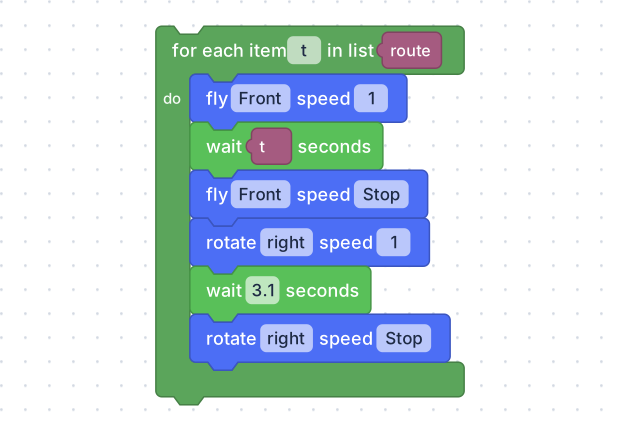
t is the item this pass is on. Dropped into the wait, it is how long this
side lasts.
route = None
t = None


route = [1, 2, 1, 2]
for t in route:
  drone.fly('forward', 1)
  time.sleep(t)
  drone.fly_stop()
  drone.rotate('right', 1)
  time.sleep(1)
  drone.rotate_stop()
Four sides of 1, 2, 1 and 2 seconds — a short side, a long one, and the same again, described by its shape rather than by four repetitions of the same six blocks. Change the list and the shape changes; nothing else has to move.