
Blocks
Loops and Timing
Repeating a manoeuvre without repeating yourself — and the wait block that makes every manoeuvre take time.
Two categories that belong together. Timing holds one idea — waiting — and without it a flight program has no duration at all. Loops holds the way to say something four times without dragging it out four times.
Timing: the wait block
wait n seconds — and that is the whole category, in two forms.
| Block | What it writes |
|---|---|
| wait 2 seconds | time.sleep(2) |
| wait ⟨value⟩ seconds | time.sleep(x) — the number comes from a block dropped in |
Waiting sounds like doing nothing, and it is the opposite. Every flight block
in the drone’s category sets a state and hands straight on: fly starts
travelling, rotate starts turning, throttle starts climbing. The wait is
where the flying happens. Remove every wait from a program and the aircraft
receives all its instructions in one instant and acts on the last one only.
Numbers between 0.1 and 60 are accepted, to a tenth of a second.
The second form matters more than it looks: its duration is a hole, not a number typed on the block, so anything that produces a number can go in it — a variable, a sum, the loop counter below.
Loops: the five blocks
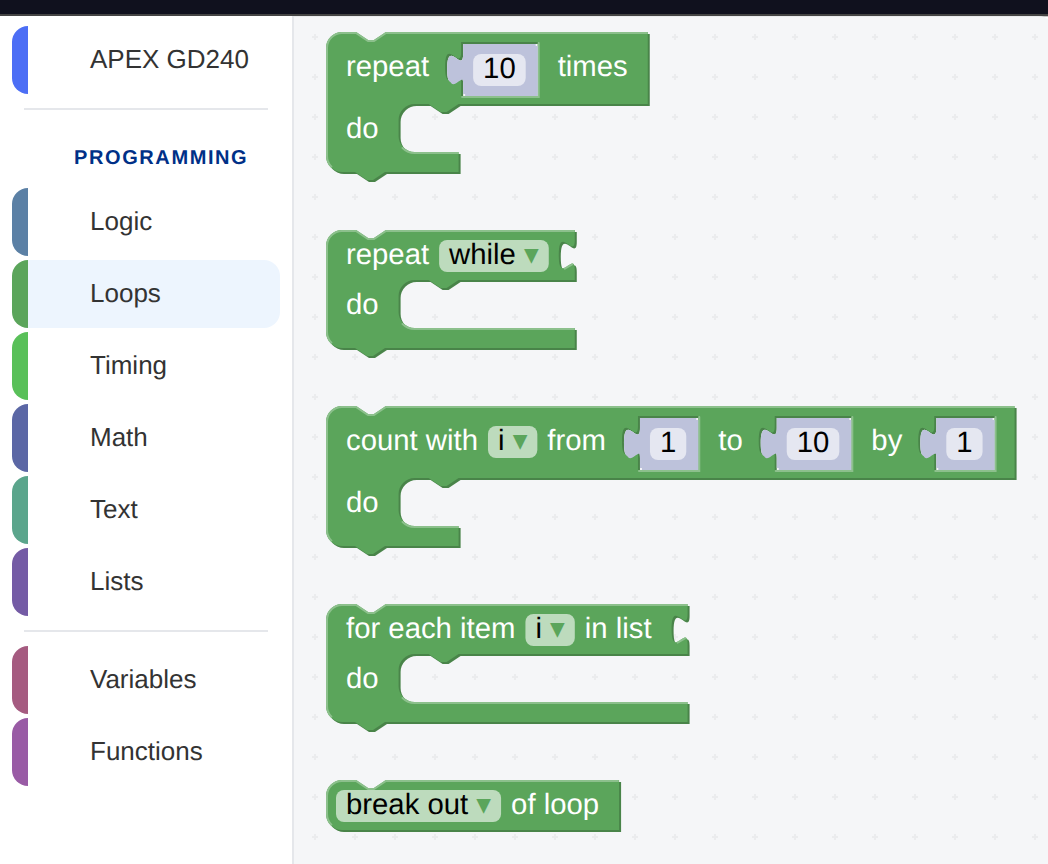
The Loops category. The green blocks with a mouth hold other blocks inside them.
| Block | What it does | What it writes |
|---|---|---|
| repeat n times | Runs what is inside it, n times. | for count in range(4): |
| repeat while / until ⟨test⟩ | Keeps going as long as the test holds. | while x: / while not x: |
| count with i from 1 to 10 by 1 | The same as repeat, except the program can see which pass it is on. | for i in range(1, 11): |
| for each item i in list ⟨list⟩ | One pass per item in a list. | for i in mylist: |
| break out of / continue with next iteration | Leaves the loop early, or skips the rest of this pass. | break / continue |
Note the shape of the first one: the 10 sits in a socket, in its own little block, rather than being typed on the loop itself. Anything that produces a number can go there instead.
Why a loop
Here is a square built the long way — start · wait · stop for each side:
Fifteen blocks for four sides, and twelve of them are the same three with one dropdown changed. That is the shape a loop is for.
A square is not four different things. It is one thing — fly a side, turn a corner — done four times. Say that instead:
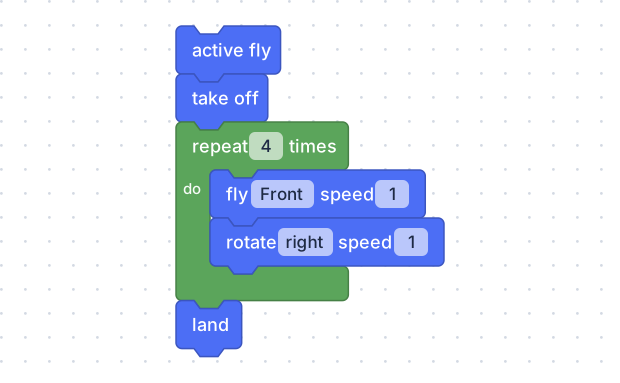
The two blue blocks sit inside the mouth of the green one. Drag them in and the loop grows to hold them.
drone.active_fly()
drone.takeoff()
for count in range(4):
    drone.fly('forward', 1)
    time.sleep(2)
    drone.rotate('right', 1)
    time.sleep(1)
drone.land()
The two waits are inside the loop with the blocks they belong to. A loop of
fly and rotate with no waits is four passes of two instructions given in
the same instant — which is four times nothing.
Notice the indent. The two lines inside the loop are pushed to the right, which is the mouth of the green block drawn a different way — that is the whole of Python’s indentation rule, and a student who has used a loop block already understands it.
The loop that knows which pass it is on
repeat cannot tell you anything about itself. count with can: it hands
you a variable — i by default — that holds 1 on the first pass, 2 on the
second, and so on. Drop that variable into a wait and every side is longer
than the last.
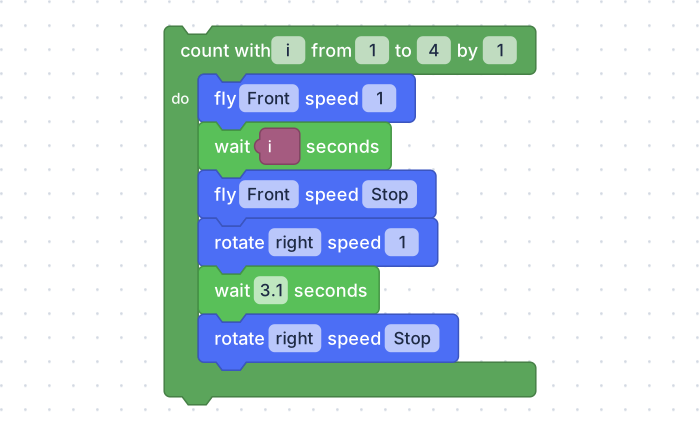
The purple i in the wait block is the loop’s counter. Four sides, each one
second longer than the one before: a spiral, not a square.
for i in range(1, 5):
    drone.fly('forward', 1)
    time.sleep(i)
    drone.fly_stop()
    drone.rotate('right', 1)
    time.sleep(1)
drone.rotate_stop()from, to and by are all sockets, so all three can be worked out
rather than typed. by 2 counts 1, 3, 5; a negative by counts down.
Repeating until something is true
repeat while / until ⟨test⟩ runs as long as its test holds. It is the loop to reach for when you do not know in advance how many passes there will be — “keep going while the battery is above 20%”.
The dropdown flips between while (keep going while true) and until
(keep going until true), which saves reaching for a not block.
Leaving early
break out of loop stops the loop immediately and carries on with whatever comes after it. continue with next iteration abandons the current pass and starts the next one. Both come from the same block, on a dropdown.
Inside an if, break is how a program says this has gone far enough:
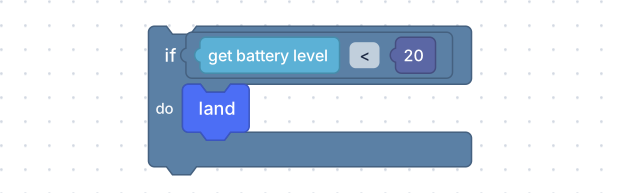
Put this inside a loop, with a break after the land, and the flight ends
itself when the battery gets low.
One pass per item
for each item i in list ⟨list⟩ walks a list, handing you one item at a time. It is the natural way to fly a route written down as a list of directions — see Lists and Text.