
Blocks
Logic and Math
Making a program decide something — and working out the numbers it decides with.
Everything up to here runs the same way every time. Logic is how a program looks at the situation and does something different because of it; Math is where the numbers it looks at come from.
Both categories are full of value blocks — the rounded ones with no notch on top. A value block never stands in the stack on its own. It drops into a hole in another block and hands over an answer.
Logic
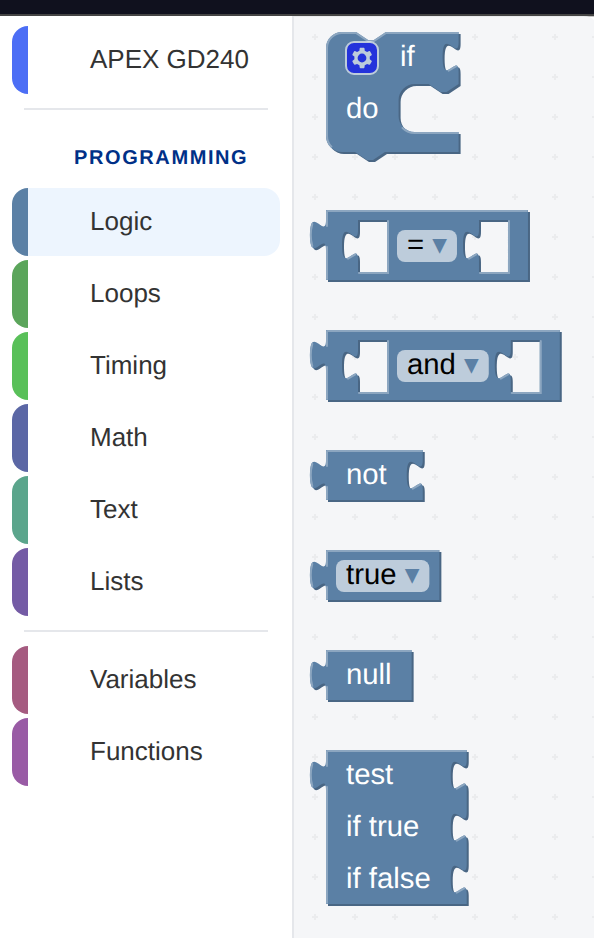
The Logic category. Every block except if is rounded — a value, not an
instruction — and the white gaps in them are holes waiting for other values.
| Block | What it does | What it writes |
|---|---|---|
| if ⟨test⟩ do | Runs what is inside only when the test is true. | if x: |
| ⟨a⟩ = ⟨b⟩ | Compares two values. The dropdown also has ≠ < ≤ > ≥. | a == b |
| ⟨a⟩ and ⟨b⟩ | True when both are. The dropdown also has or. | a and b |
| not ⟨a⟩ | Turns true into false and back. | not a |
| true / false | A value you can drop into a test. | True |
| null | Nothing, deliberately. | None |
| test ⟨a⟩ if true ⟨b⟩ if false ⟨c⟩ | Picks one of two values without an if block. | b if a else c |
The if block
Drag one out and it has a single mouth. That is the whole idea: when this is true, do that.
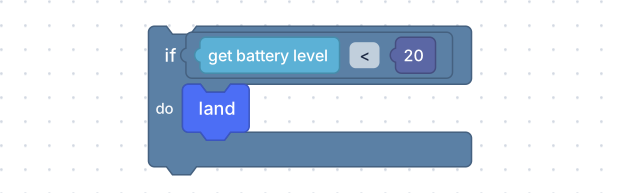
The comparison is a value block dropped into the if block’s hole; the battery
reading is another value block dropped into the comparison’s. Blocks in holes,
all the way down.
if (drone.get_battery()) < 20:
  drone.land()
The brackets around the reading are the editor being careful, not you being wrong: a value block dropped into a hole gets wrapped so that whatever is inside it cannot come apart when it lands in a bigger expression.
There is no “if else” block in the toolbox, and looking for one is a waste of a
minute. Instead, the if block carries the small blue gear you can see in
the picture above: click it and a panel opens where you can add an else (do
something different when the test is false) and further else if branches. A
handful of other blocks carry the same gear for the same reason — create text with, create list with, and a function definition — and it always means
this block can grow.
Comparisons
One block, six operators on a dropdown: =, ≠, <, ≤, >, ≥. Both
sides are holes, so both sides can be anything that produces a value — a
battery reading, a variable, a sum, a plain number.
= writes == in Python, with two equals signs, because a single = already
means “put this value in that variable”. You will never type it, but you will
read it.
and, or, not
and is true only when both sides are; or is true when either is. They chain,
so battery above 20 and height below 2 is one and block with a
comparison dropped into each side.
not inverts whatever it is given. It is usually avoidable — not (a = b) is
just a ≠ b — and the shorter form is easier to read at a glance.
Math
Thirteen blocks. Most programs use three of them.
| Block | What it does | What it writes |
|---|---|---|
| number | Any number. Click it and type. | 123 |
| ⟨a⟩ + ⟨b⟩ | Arithmetic. The dropdown has − × ÷ ^ too. | a + b |
| square root ⟨a⟩ | And absolute value, negation, ln, log10, e^, 10^. | math.sqrt(a) |
| sin ⟨a⟩ | And the rest of the trigonometry, in degrees. | math.sin(a / 180.0 * math.pi) |
| π | And e, φ, √2, √½, ∞. | math.pi |
| ⟨a⟩ is even | Even, odd, prime, whole, positive, negative, divisible by. | a % 2 == 0 |
| round ⟨a⟩ | And round up, round down. | round(a) |
| sum of list ⟨list⟩ | And min, max, average, median, mode, standard deviation, random item. | sum(mylist) |
| remainder of ⟨a⟩ ÷ ⟨b⟩ | What is left over. | a % b |
| constrain ⟨a⟩ low ⟨b⟩ high ⟨c⟩ | Keeps a number inside a range. | min(max(a, b), c) |
| random integer from ⟨a⟩ to ⟨b⟩ | A different whole number each run. | random.randint(a, b) |
| random fraction | A different number between 0 and 1 each run. | random.random() |
| atan2 of X: ⟨a⟩ Y: ⟨b⟩ | The angle to a point, in degrees. | math.atan2(b, a) / math.pi * 180 |
The three that earn their place in a flight program
random integer from 1 to 3 makes a program that is different every time it
runs. Dropped into a wait block, it flies a different distance on each pass —
which is a much better test of a landing zone than the same flight repeated.
remainder of ⟨i⟩ ÷ 2 is how a loop tells odd passes from even ones. With
a count with loop and an if, that is a zigzag: go forward, then dodge left
on the even passes and right on the odd ones.
constrain is the block that stops arithmetic producing a nonsense
instruction. A speed worked out from a sum could come out as 7 or as −1, and a
constrain … low 1 high 2 around it guarantees the answer is a speed the drone
actually has.