
Blocks
Reading the Python
Optional. What the code panel on the right is, and how to read it without having to write any.
Press the <> button on the right edge of the editor and a panel opens
beside the blocks.
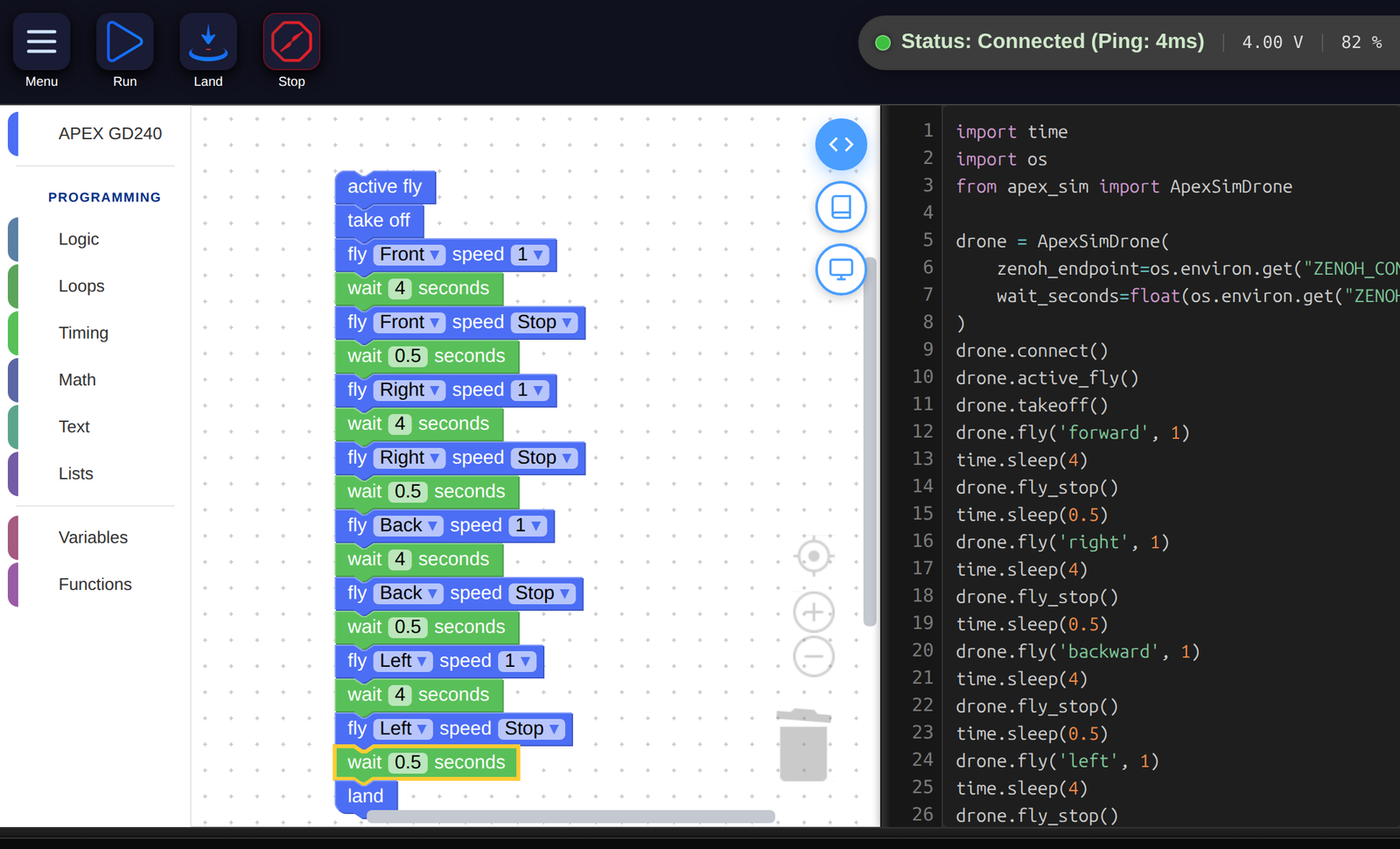
The same program twice. The blocks on the left are the program; the Python on the right is a description of it, rewritten every time you move a block.
Three parts, and only one is yours
import time                                    ┐
import os                                      │
from apex_sim import ApexSimDrone              │
                                               │  the header —
drone = ApexSimDrone(                          │  the same in every program
    zenoh_endpoint=os.environ.get("…"),        │
    wait_seconds=float(os.environ.get("…")),   │
)                                              │
drone.connect()                                ┘

drone.active_fly()                             ┐  your blocks,
drone.takeoff()                                │  one line each,
drone.land()                                   ┘  in the same order

drone.disconnect()                             ]  the footer
The header finds the aircraft and says hello. The footer says goodbye. You never write them, never edit them, and they are identical in every program anybody writes — so after the first look you can stop seeing them, the way you stop seeing the address on an envelope.
The middle is yours, and it has the property that makes the whole thing readable: one block makes one line, in the same order, top to bottom.
The proof that the blocks are the program
Switch the same stack from the simulator to a real aircraft and the middle does not change at all. Only the header does:
from apex_sim import ApexSimDrone

drone = ApexSimDrone(
    zenoh_endpoint=os.environ.get("ZENOH_CONNECT_ENDPOINT", …),
    wait_seconds=float(os.environ.get("ZENOH_WAIT_SECONDS", …)),
)from apex_sdk import ApexDrone
drone = ApexDrone(
interface=os.environ.get("APEX_INTERFACE"),
ip=os.environ.get("APEX_IP", …),
)drone.takeoff() is drone.takeoff() either way. A program worked out in the
simulator is not a rehearsal for the real thing — it is the real thing, pointed
somewhere safe.
Reading a line
Every drone line has the same shape:
drone . fly ( 'forward' , 1 )
  │      │      │         │
  │      │      │         └── the second dropdown: speed
  │      │      └──────────── the first dropdown: direction
  │      └─────────────────── which block it was
  └────────────────────────── the aircraft
The dots and brackets are punctuation, and they always mean the same thing:
drone.something(...) is ask the drone to do something, and what is in the
brackets is the detail. A block with no dropdowns has nothing in its brackets —
drone.land().
The words in the brackets are not always the words on the block: Front
becomes 'forward' and Back becomes 'backward'. And Stop is not a value
at all — it changes which function is called, from drone.fly('forward', 1) to
drone.fly_stop().
Reading a shape
A block with a mouth becomes an indent: the lines inside the mouth are pushed to the right.
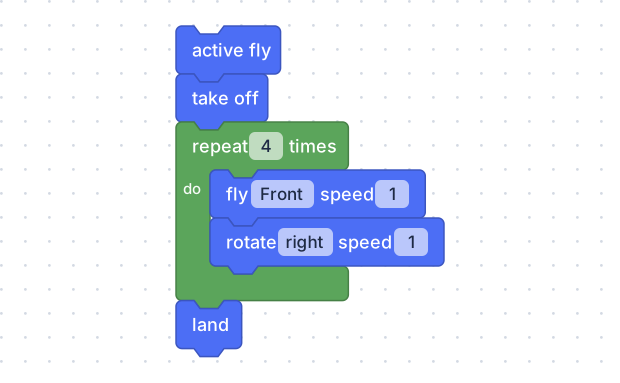
drone.active_fly()
drone.takeoff()
for count in range(4):
  drone.fly('forward', 1)
  drone.rotate('right', 1)
drone.land()
The two indented lines are the two blocks in the mouth; drone.land() comes
back out to the left because it is below the loop, not inside it. That is the
entirety of Python’s indentation rule, and reading it off a block you already
drew is a considerably kinder introduction than being told about it.
What the panel does and does not do
- It is rewritten on every change. Move a block and the code changes under your hand; the two are never out of step.
- It is a view of the blocks, not a second place to work. The blocks are the program.
- It leaves out what is not needed. A program with no drone blocks at all —
just Math and
print, say — gets no header and no footer, because there is no aircraft to greet. Three lines of blocks make three lines of Python.
Where to go next
The Python here is ordinary Python, and everything it does is in the Python documentation like anybody else’s. The things worth knowing first, in the order they will come up:
time.sleep(2)— waiting, which you already understand as thewaitblock.for … in range(4):— therepeatblock.if …:— theifblock.name = value— thesetblock.def name():— theto … doblock.
Five constructs, all of which you have already used with a mouse. That is the whole point of the code panel: by the time you read it, you know what it says.